Key Takeaways
- Finance teams still do manual work on a working ERP because the ERP holds the transaction. The context needed to act on it sits in the CRM, the service desk, email and spreadsheets.
- Most of the lost time is in collections, invoice approvals, exceptions and the month-end close. Half of finance teams take six or more business days to close the books (Ledge, 2025).
- Upgrades and new modules rarely remove the work, because they improve what happens inside the ERP and the manual work happens between systems.
- On-prem ERPs are staying. Oracle supports E-Business Suite 12.2 through at least 2036, so any fix has to work alongside the system you already have.
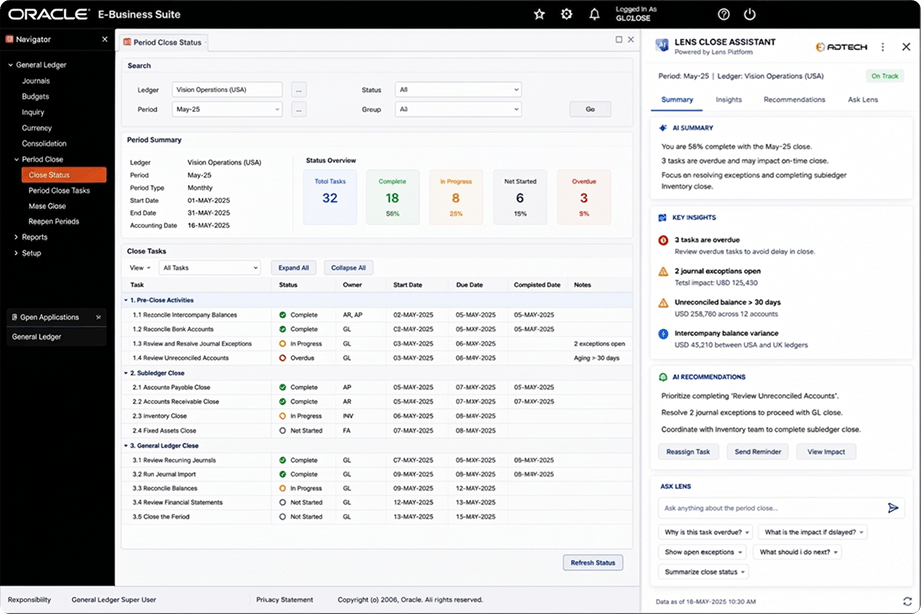
- The manual layer shrinks when software reads across your systems, shows people what needs attention and takes routine steps within rules you set.
Finance teams still do manual work on a working ERP because the ERP only holds the transaction. The context needed to act on it, such as a customer’s promise to pay, an open dispute or an approver’s question, lives in other systems. People bridge those gaps by hand, and that is where the hours go.
The distinction matters because it changes what you fix. If the ERP itself were slow or wrong, replacing it would help. In most finance teams, the ERP posts the invoice correctly every time. What drags is everything that happens before and after that posting.
What manual work happens around an ERP, and why?
Most of it is gathering. Before a collector calls a customer, they check the aging report in the ERP, the call notes in the CRM, the ticket in the service desk and the email thread in their inbox. Before an approver signs off on an invoice, they write back to ask what it’s for. Before the close, someone reconciles bank data against the ledger across several tools.
The ERP was built to be the system of record, not the place where people work out what to do next. It knows an invoice is 45 days past due. It doesn’t know the customer promised to pay on Friday. So people carry that context in spreadsheets, inboxes and their own memory, and rebuild it every time a decision comes up.
Where the manual work sits, process by process
| Process | What the ERP holds | What lives somewhere else | The manual step |
|---|---|---|---|
| Collections | Open invoices and aging | Promises to pay, call notes, disputes | Piecing each account together before a call |
| Invoice approvals | The invoice and the PO | The approver’s questions and context | Chasing sign-off by email |
| Exceptions | PO, receipt and invoice records | The reason they don’t match | Comparing documents and finding the owner |
| Month-end close | The general ledger | Bank data, reconciliations, checklists | Reconciling across tools and tracking open items |
| Procurement | Purchase orders and spend | Contract terms and supplier risk | Checking spend against contracts by hand |
Which finance processes lose the most time to it?
Four processes take the biggest hit: invoice approvals, exceptions, the month-end close and collections. In Ardent Partners’ State of ePayables 2025, 49% of AP leaders named slow approvals as a top challenge, the most of any issue. The average invoice took 8.2 days to process, and 48.6% of invoices were still submitted manually.
The close shows the same pattern. Ledge’s 2025 month-end close benchmark found that half of finance teams take six or more business days to close, and only 18% finish in three days or fewer. Cash reconciliation alone took 20 to 50 hours a month, usually across three to five systems.
In collections, the cost is cash. Atradius reports that 43% of credit-based B2B sales in the US are overdue.
Why doesn’t an upgrade or new module fix it?
Because upgrades improve the system of record, and the manual work sits between systems. A new AR module still can’t see the promise a customer made on the phone or the dispute logged with customer service. On a heavily customized ERP, each new module also brings testing, retraining and the risk of breaking customizations the business depends on.
Replacing the ERP isn’t a near-term option for many teams either. Oracle has extended Premier Support for Oracle E-Business Suite 12.2 through at least 2036, and for JD Edwards EnterpriseOne 9.2 through at least 2037. Teams on these systems have no deadline forcing a move, and good reasons not to rush one. The practical question is how to remove the manual work while the ERP stays where it is.
How do you remove the manual layer without replacing the ERP?
Add software that reads across the systems you already run, works out what needs attention and takes the routine steps itself, within rules you set. In collections, that means ranking accounts by risk instead of age, sending reminders on your dunning schedule and routing each dispute to the person who can settle it. Write-offs, credit holds and legal escalation stay with your team.
Start with one workflow where the rules are already written down and the result shows up in a number you track. Gartner analyst Anushree Verma says organizations “can start by using AI agents when decisions are needed, automation for routine workflows and assistants for simple retrieval.” Matching the tool to the job keeps the first project small enough to measure.
Frequently Asked Questions
Why do finance teams still do manual work if they have an ERP?
Because the ERP holds the transaction but not the context needed to act on it. Promises to pay, disputes, approver questions and contract terms live in the CRM, the service desk, email and spreadsheets. People gather that context by hand before each decision, and that gathering is most of the manual work finance teams do.
What are the most common ERP workarounds in finance?
Spreadsheets that track promises to pay and open items, email chains that chase approvals, shared drives that hold contract terms, and manual reconciliations at month-end. Each one fills a gap between the ERP and another system.
Which month-end close tasks are still manual?
Reconciliations, chasing open items, reviewing exceptions and tracking checklist status. Ledge’s 2025 benchmark found that cash reconciliation alone takes finance teams 20 to 50 hours a month, usually across three to five systems.
Will upgrading our ERP reduce manual work?
Usually not by much. Upgrades improve what happens inside the ERP, while most manual work happens between the ERP and other systems. On a heavily customized ERP, an upgrade can also add testing and change work before it saves any time.
Can finance process automation work without replacing the ERP?
Yes. Software can read the ERP and connected systems where they sit, flag what needs attention and take routine steps such as reminders and routing within rules you set. People keep the decisions that carry risk, such as write-offs and credit holds.
Build note: FAQ goes on the page as visible text, not inside an accordion.
ERPLens is built for this layer. It sits on top of the systems you already run and gives each person a workspace showing what needs them now.
For a step-by-step approach, including a six-week pilot plan, download The Agentic Finance Playbook for On-Prem ERP. Next in this series: where cash gets stuck in on-prem AR workflows.